
Setting up a new account
If your school is new to Intelligent Evidence, register first at Register. You'll then receive a confirmation email (check your spam folder if it doesn't arrive) asking you to confirm your email address and set a password.
Inviting other users
When you invite colleagues to your account, they'll receive their own confirmation email and need to confirm their email and set their password themselves, in the same way.
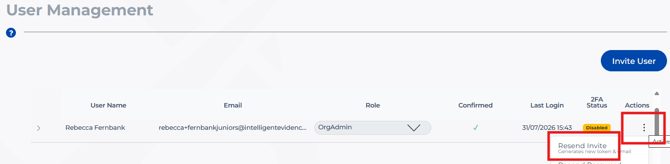
Invites are valid for around 48 hours. If someone doesn't confirm within that window, their invite expires, and your Org Admin (whoever set up the account and sent the original invite) will need to resend it.
As an Org Admin, to do this, go to Users on the left menu, click the three dots menu at the end of that person's row, and select Resend Invite.
Can't log in?
You must confirm your email address before you can access the platform. If you haven't done this yet, check your inbox and spam folder for the confirmation email first.
Resetting your password
You can reset your password at any time from the login screen using Reset password
Still stuck? Contact us via Live Chat (business hours) or email support@intelligentevidence.co.uk and we'll help sort it out.