
Type of release: New Features & Bug Fix
Applies to: All schools / academies
Release date: 10th June 2026
Features
The key changes included in this release are:
-
More actions available across Upload & Review and Documents - You can now perform more document actions without switching between pages. The Documents page now includes an Add New Evidence button, and the Upload & Review page now includes a Rescan Document button and a Reject All button. This means you have the same core tools available wherever you are managing your documents, saving time and reducing the need for workarounds.

-
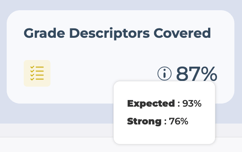
Grade Descriptor breakdown on the School Dashboard - The Grade Descriptors Covered card on the School Dashboard now includes an information icon. Hovering over it shows a tooltip with a breakdown of your coverage by grade descriptor - for example, Expected and Strong for Ofsted, or Grade 1 and Grade 2 for the Catholic Schools Inspectorate. The combined percentage on the card remains unchanged - the tooltip simply gives you a clearer picture of the coverage behind that number.
Bug Fixes
-
Dashboard - Multiple evidence summary pop-ups appearing at once - When clicking between icons on the dashboard quickly, multiple evidence summary pop-ups could appear at the same time. This has been fixed - only one pop-up will show at a time, and it closes correctly when you move to another category.
Getting Started / Next Steps
These changes are live and no action is needed on your part. If you have any questions or feedback, please contact your Relationship Manager or email the support team at support@intelligentevidence.co.uk.