
Once a document is uploaded, the platform will suggest evidence from it, but the final decision on whether it's suitable is always yours.
When analysis is complete, the document will show as "Complete." Click the down arrow to expand it and view the suggested evidence.

As an Approver, you can:
- Approve (green tick) — add it to your evidence base
- Reject (red cross) — remove anything you don't feel is accurate or relevant
- Edit — change the wording or add extra context before you approve it
- View Document — open the original file in a new tab
- Add Notes — useful for reminders or comments from the team
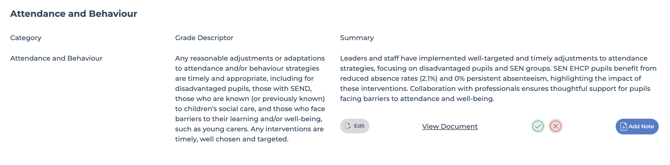
Once you approve a piece of evidence, it moves into your evidence base and will appear on your report.
Remember:
Intelligent Evidence makes suggestions, but you make the decisions. This is your school's story, told on your terms - so it must represent your school accurately.
The system is designed to find the positives in your evidence, so it's worth checking suggestions carefully, especially when they involve:
- Performance data - always check a suggested statement against the source figures before approving it. A positive-sounding summary doesn't mean the underlying data meets the standard.
- Comparisons against a threshold (e.g. "strong," "national average") - if your data is below the standard, the wording should reflect that. Edit or reject anything that doesn't.
When in doubt, use Edit to correct the wording, or Reject if it doesn't reflect reality. Every suggestion is a starting point.