
Not every inspection category applies to every type of school. For example, Early Years categories are not relevant to Secondary schools, and Post-16 categories do not apply to Primary schools.
Setting your school type in Intelligent Evidence removes unnecessary grade descriptors, so that dashboards, evidence calculations, and grade descriptor counts only reflect what is relevant to your school.
To configure your school type, follow the steps below:
-
Click on the Settings button in the top right hand corner of the portal.
-
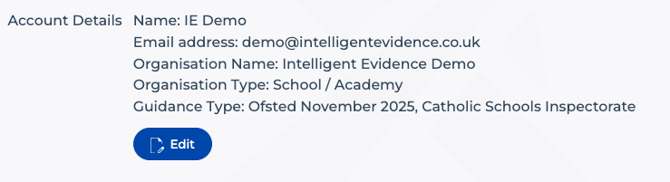
The Account Settings page displays your current account details.
-
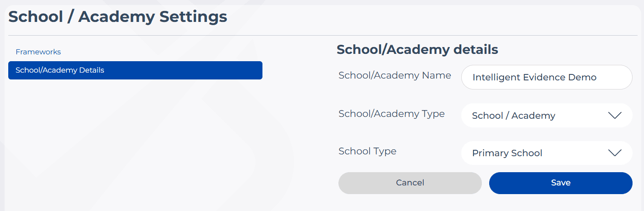
Click Edit, then select School/Academy Details from the left-hand menu. Here you can modify your account name and school type.
-
Click the School Type dropdown to select the appropriate type for your school. A list of options will appear including:
- All-through school
- All-through school (Voluntary Aided / Controlled)
- Further Education
- Nursery School
- Other
- Primary (Voluntary Aided / Controlled)
- Primary School
- Secondary (Voluntary Aided / Controlled)
- Secondary School
-
Once you have made your selections, click Save. To discard changes, click Cancel instead.
- Once your school type is saved, the Evidence Base, dashboard and evidence calculations will automatically apply the relevant category restrictions.