
Get a clear picture of your evidence coverage and where to focus next.
This is your Evidence Base — also your platform home page. It's built to show you exactly where you stand, and what to do next, based on what's still missing.
On the Evidence Base, you'll see:
- How many grade descriptors you have covered
- Evidence by strength (Expected/Strong)
- The total number of documents uploaded
- A breakdown of evidence by framework area

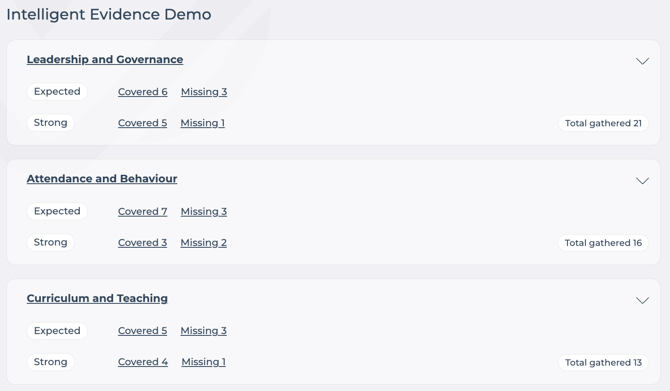
Use the down arrow to expand each category and view the grade descriptors underneath it, along with the strength and evidence tied to each one. Missing or incomplete descriptors are flagged clearly, so you always know what to tackle next.
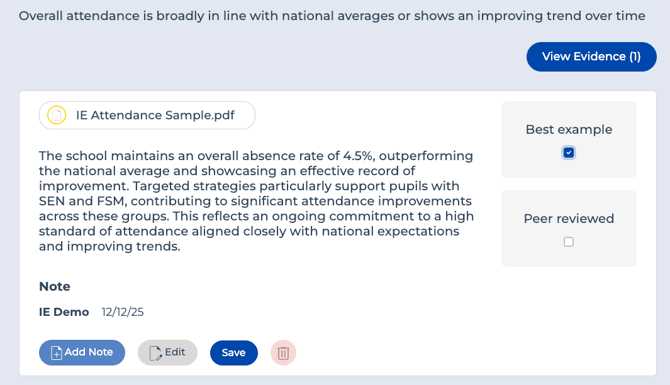
Click View Evidence on any grade descriptor to:
- View and open documents
- Edit or add notes
- Delete entries where appropriate
- Mark standout pieces as 'Best Example'
- Flag evidence as 'Peer Reviewed' - useful when several staff are working on the platform together, so an SLT member or lead reviewer (e.g. the Head) can give it a final check.
You can now continue uploading documents to build a complete, robust evidence base.
Next
Our School Evidence Dashboard gives you a simple visual summary of your school's evidence position at a glance and helps you quickly identify gaps.