If your MAT or Trust uses the MAT Dashboard, you can see all your linked schools' progress at a glance, using a traffic light system that shows whether each school is sitting at Expected, Strong, or hasn't yet completed a section to Expected standard.
Getting oriented
Click the "?" icon in the top left of the screen at any time to open a guided tour of the dashboard.

Switching Frameworks
Intelligent Evidence supports multiple frameworks, such as CSI, SIAMS, and the Early Years Inspection Toolkit (September 2026). Use the dropdown in the top right of the MAT Dashboard to switch between them.
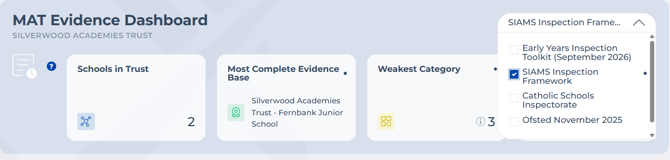
When you switch frameworks, the dashboard only shows schools that have that framework selected, so you're always looking at a consistent, relevant set of schools.
Trust Overview
At the top of the page, you'll see a snapshot of your trust-wide position, helping you quickly understand overall performance and where to focus attention across your schools:
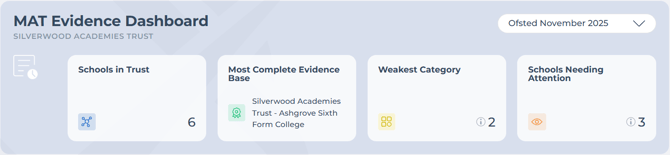
- How many schools in the trust are set up on Intelligent Evidence
- Your most completed evidence base (names the school)
- Your weakest category across all schools in the trust
- The school needing the most attention (hover the "i" icon here to see the full list of schools, rather than just the one)
Hover over any of these indicators for more detail on how it's calculated.
Below this, you'll see collective totals across all schools, showing the number of grade descriptors covered for Expected and Strong.
Evidence Grading by Category
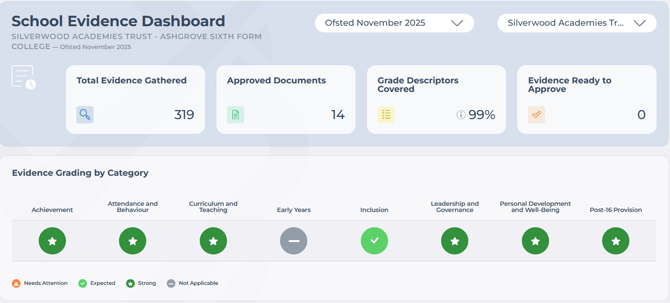
This table shows each school's position across categories, so you can compare schools, identify patterns, spot areas needing attention, and see consistency across the trust.
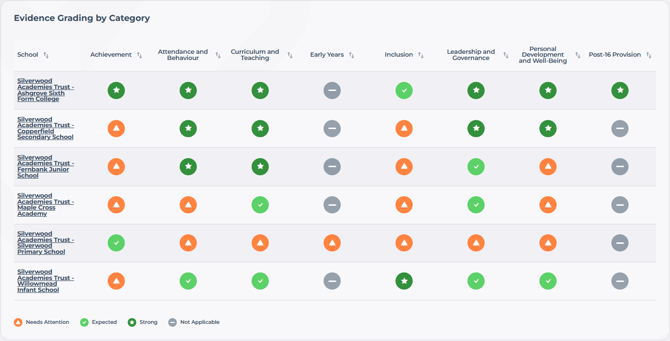
Use the sorting arrows on any column to compare schools more easily and identify who might need support. Use the dropdown selector to filter by framework.

School Overview
Select a school from the table to drill down into its evidence in more detail. From here you can review coverage, explore descriptors, and support schools where needed. You'll have a read-only view (at the moment) of the evidence they've gathered.
Generating a report
You can generate an export from the MAT Dashboard in the same way as an individual school report, except it includes every school in your trust. See Generate an Evidence Report for how this works.
Managing users
The Users button works the same as it does for an individual school account. See Invite Your Staff and SLT to Collaborate