
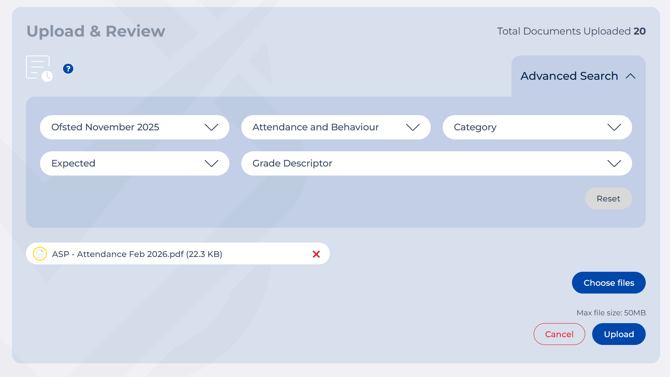
- From the menu on the left, click Upload & Review.
- Click Choose Files and select your documents from the file explorer. Most standard file types are supported. If you have a full subscription, you can upload up to 10 documents at a time (combined size under 50MB). On the free trial, that limit is up to 5 documents at a time, with the same 50MB combined cap.
- Choose the strength you would like to start with, and then select a Top Level Group from the drop down menu. Use the filters to guide your upload:
- Framework - choose the framework you want to evaluate against
- Strength - select Expected or Strong
- Top Level Group - select from the 8 Ofsted areas (for example Attendance and Behaviour, Leadership and Governance)
- Grade Descriptor - optional. Not sure yet? Leave it unticked — as long as Strength and Top Level Group are selected, you're good to go.
Tip: spotlight, don't floodlight. It's tempting to upload everything you've got in one go, but you'll get much better results by focusing on one area at a time. The platform does its best work when it can concentrate on a specific area, and you'll avoid being handed hundreds of pieces of evidence to sort through all at once. You can go back and Rescan for another area later.
Working through your framework area by area also just feels a lot less daunting, especially when you're getting started.
4. When you're ready, hit Upload.
5. Your documents will appear as "Pending" while the system analyses them. This normally takes under 30 seconds — refresh the page to check progress. Larger documents, or several uploaded together, can take up to 2 minutes.

In the free trial, you can upload up to 5 documents in one go, as long as the combined size doesn't exceed 50MB.